Dat One: Truck Load Board
- 3.9
- Rating
- 1.00M
- Installs
- Free
- Price

 Analysis by App-foxy
For a trucker, finding a suitable load is only one part of the job. The harder part is judging whether the lane, payment, timing, and pickup details make sense before committing. DAT One is built around that working reality. I found it most useful as a business tool for checking available freight, comparing options, and keeping navigation and rate discussions closer to the same workflow instead of jumping between unrelated apps.
This is a free business app from DAT Solutions, aimed at people who already understand the basics of hauling freight or are preparing to manage loads professionally. It is available for Everyone and has passed the million-install mark, with an average rating of 4.2 from roughly 3.9K ratings. Those figures suggest a well-established tool, but they do not mean it will feel effortless to every new user. A load board becomes valuable only when the information matches your equipment, area, schedule, and willingness to negotiate.
What to expect before you start searching
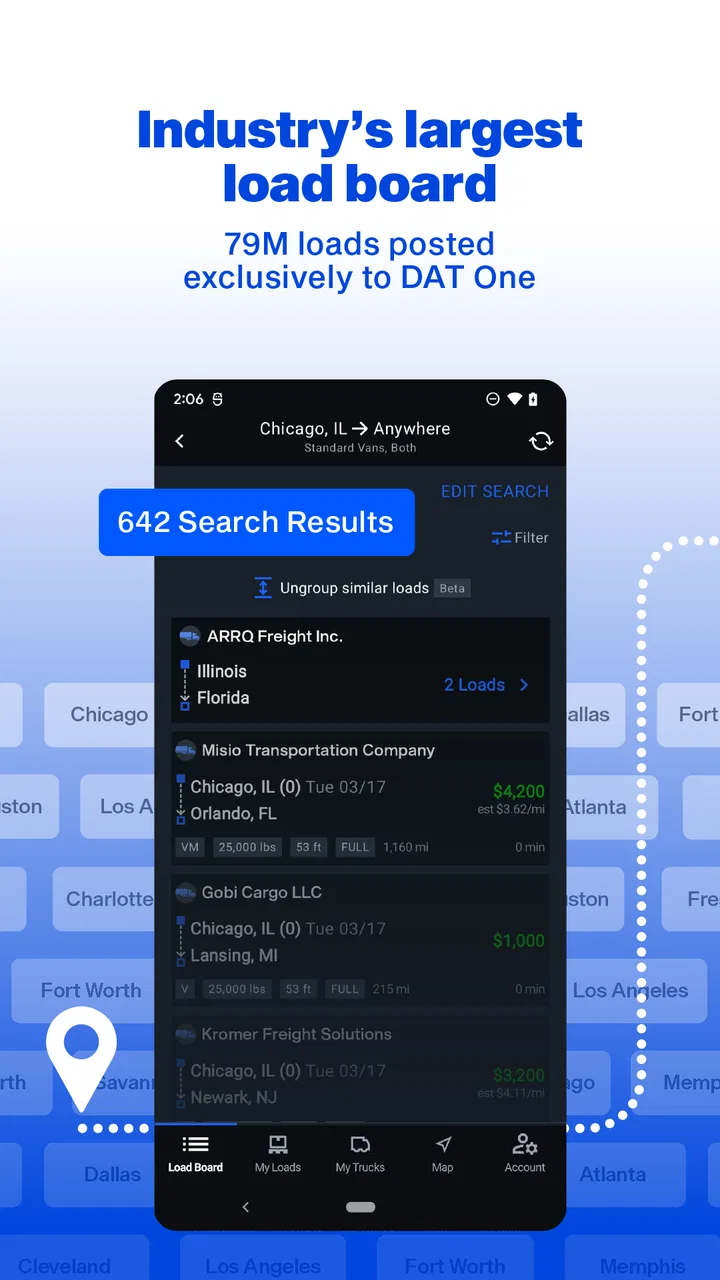
The central idea is straightforward: DAT One puts a large freight marketplace in a mobile format and adds tools that help with route planning and rate conversations. I would not treat it as a simple list of jobs. The useful part is the decision process around each load. You are trying to filter out freight that looks attractive at first but creates a poor trip once deadhead, timing, or delivery direction is considered.
You May Also Like

 Blood Strike: 2.5 Anniversary
Blood Strike’s Loadouts Turn Every Drop Into a Tactical Gamble
A close look at Blood Strike’s custom loadouts: how fast access to signature weapons reshapes its battle royale rhythm, rewards preparation, and narrows the gap between fights.

 Pandora - Music & Podcasts
Pandora’s Music Is Easy to Start, but Harder to Recover
Pandora’s strength is its low-effort path from a seed to a station. Its weak spot is how much confidence it asks you to place in connection, setup, and quiet recovery.

 8 Ball Pool
 Is Built on Rivalries, Rematches, and Routine
A close look at the rivalries, rematches, shared routines, and unanswered safety questions that turn a quick pool match into a persistent mobile community.

 Samsung Music
’s Quiet Strength Is Playing What You Already Own
Its reach comes less from spectacle than from dependable access to a personal library. That simplicity is both the app’s strongest retention engine and its ceiling.

 AccuWeather: Weather Radar
AccuWeather Review: A Quick, Clear Forecast for Everyday Decisions
For everyday plans, the best forecast is the one you can understand quickly. AccuWeather makes rain timing, radar, and local conditions easy to act on, with a few trade-offs.

 Hill Climb Racing
Why Hill Climb Racing Still Turns Crashes Into One More Run
A tiny car, a bumpy hill and one more upgrade: Hill Climb Racing keeps resurfacing because its simple chaos makes every near-miss feel personal.
More From Our News Desk



That distinction matters for first-time users. The app can help you discover opportunities, but it does not replace your own checks. A load that fits your trailer type may still be wrong for your hours, preferred lanes, fuel plan, or return strategy. I recommend opening it with a clear idea of what you can actually haul rather than browsing every result and hoping the right one becomes obvious.
DAT One is best suited to owner-operators, small carriers, dispatchers, and other transport professionals who need frequent access to freight information while away from a desk. It is less appealing for someone who only wants occasional local work or a general navigation application. If your main need is turn-by-turn driving directions, a dedicated navigation app will usually feel simpler. If your main need is broad freight discovery and negotiation, this app has a more relevant purpose.
Why the mobile format can be useful on a working day
The phone format makes the most sense between stops, during a planned break, or while preparing the next leg of a trip. I would avoid trying to compare loads while driving. The advantage is not that every task becomes automatic; it is that you can review freight without needing to return to a computer every time your plans change.
Navigation support is particularly helpful when evaluating a load rather than merely following it. A route can reveal whether a pickup pulls you away from your current position, whether the delivery direction fits your next move, and whether the schedule leaves enough room for realistic driving. I still verify important details separately before accepting anything, because an app view cannot replace communication with the broker or shipper.
The negotiation tools also deserve the right expectation. They are useful for organizing a rate discussion and making a more informed request, but they do not guarantee a better offer. Your leverage depends on the lane, timing, equipment, availability, and the quality of your communication. I see the app as a support for a professional conversation, not as an automatic rate-raising button.
Setting up a useful first search
The current version is 1.74.0.639, and the app supports devices running Android 7.0 or later. After installing it, I would take a few minutes to make the working context clear before chasing individual listings. Have your equipment type, current area, preferred operating region, and realistic availability in mind. Even when the app does not require you to enter every detail immediately, this preparation makes the results easier to judge.
A common beginner mistake is searching too broadly. A wide search may look productive because it produces many possibilities, but a long list can hide the few loads that genuinely fit. Start with a corridor you would actually drive and a time window you can honor. Then expand only if the results are too thin. This approach also makes the negotiation stage more focused because you know why a particular load is worth pursuing.
I also suggest deciding your minimum acceptable trip before opening the board. That does not mean choosing one rigid number and refusing to adapt. It means accounting for the empty distance to pickup, tolls, fuel, waiting time, and the direction you will finish in. A load can look good at the posted rate while becoming weak after those practical costs are considered.
A simple first-time setup routine
Begin with your actual starting point, not the place you wish you were already positioned. This keeps the navigation and deadhead judgment grounded in reality.
Choose freight that matches the equipment you can legally and practically use. Do not assume a promising description automatically covers your trailer, weight, or handling requirements.
Set a narrow search area and a manageable pickup window. A smaller result set is easier to compare than a screen full of distant possibilities.
Open the most suitable listings and read the details before contacting anyone. Note pickup and delivery timing, special requirements, and anything that could create extra waiting.
Use the route view to test the trip as a whole, then prepare a short list of questions for the broker or shipper.
This routine is more valuable than simply learning where each button sits. The first meaningful success is not installing the app or seeing a load. It is finding one realistic option, understanding the trip, and contacting the relevant party with enough information to have a useful conversation.
How to reach the first meaningful result
Imagine finishing a delivery in the afternoon and wanting freight that moves you toward your next preferred operating area. I would enter the current location, search the likely outbound direction, and compare several nearby pickup choices rather than selecting the first result. The best candidate is not necessarily the closest pickup. It may offer a cleaner delivery direction or reduce the empty miles after the drop.
Once a load catches your attention, look at it in three passes. First, check whether the equipment and timing are workable. Second, examine the route and the positioning cost. Third, decide whether the rate deserves a call or message. This order prevents a tempting figure from dominating your judgment before you understand the actual trip.
When you contact the other party, keep the conversation specific. Confirm the pickup appointment, delivery expectations, commodity or handling details, and any conditions that affect your ability to complete the run. If you are negotiating, explain your position clearly instead of sending a vague request for more money. The app can help you reach the conversation, but the quality of the conversation still comes from you.
One practical advantage is that navigation and negotiation are considered within the same load-finding workflow. I found that useful when comparing two similar options. Rather than looking only at the gross rate, I could think about how each route affected my next move and whether the trip left me well positioned. That is the kind of small decision support that can matter repeatedly over a week.
Three habits that make the board more useful
Use direction as a filter, not just distance. A nearby load can be a poor choice if it leaves you far from the freight you normally want next. When two offers appear similar, I give serious weight to where the delivery leaves me, because repositioning can erase the apparent advantage of a short pickup.
Separate a promising listing from a confirmed plan. Save your attention for loads that fit, but do not mentally count one as yours until the details are agreed and the paperwork or confirmation is handled through the normal business process. This prevents a changing listing from disrupting your schedule prematurely.
Prepare negotiation notes before making contact. Have the route, timing, empty distance, and the reason the load works for you in front of you. That makes the discussion faster and helps you recognize when a small rate improvement is not enough to compensate for an awkward appointment or poor destination.
These habits are easy to overlook because a load board encourages quick scanning. In practice, the strongest results come from slowing down for the few listings that deserve serious attention.
Where first-time users can get confused
The biggest source of confusion is assuming that a search result is already a complete business opportunity. Freight listings can require interpretation. You may need to clarify what is included, how strict the schedule is, and whether the route fits your operating plan. I would never accept a load based only on a headline rate or a quick glance at the origin and destination.
Another point of friction is the difference between finding freight and managing every part of a shipment. DAT One is centered on the load-board and planning side of the process. It should not be treated as a full replacement for your broader carrier workflow, records, communication habits, or compliance checks. If you expect one mobile app to handle every administrative responsibility, the experience may feel incomplete.
Navigation can also create false confidence. A route suggestion helps you estimate the trip, but it does not know every operational detail that may affect a truck. I use it as a planning aid and then apply common sense about access, appointments, weather, road restrictions, and the realities of loading and unloading. The app is most helpful when it informs your judgment rather than replacing it.
New users may also wonder whether the free price means there is no professional value behind it. In my experience, the more important question is whether the available freight and workflow fit your business. Free access lowers the barrier to trying it, but the time you spend searching still has a cost. If your lanes are too narrow or your freight needs are very occasional, you may not gain enough from maintaining another work tool.
Who should use it and who should look elsewhere
I would recommend DAT One to an owner-operator who regularly needs to identify the next load, a small carrier that wants mobile access to freight opportunities, or a dispatcher who needs to compare lanes while coordinating a truck. It is also a sensible option for someone moving from informal searches toward a more structured process, because the combination of load discovery, route thinking, and negotiation keeps the important questions together.
I would be more cautious if you are a new driver without a clear understanding of rates, appointments, equipment limits, or carrier responsibilities. The app can expose you to opportunities, but it cannot teach every part of the freight business. In that situation, guidance from an experienced dispatcher, carrier, or mentor is more important than installing another tool.
It may also be the wrong choice for a driver who only needs directions, a local delivery company that rarely searches a broad market, or a business already committed to a different load-board workflow that its team understands well. Switching tools has a learning cost. DAT One is worth considering when its freight coverage and mobile planning approach solve a real problem, not simply because it is available at no charge.
What I would do after the first successful load search
After finding and evaluating one suitable opportunity, I would not immediately broaden every setting. Instead, I would repeat the same search method on the next working day and note what actually helped: the search area, the direction, the timing, and the questions that prevented wasted calls. Over time, this turns the app from a scrolling marketplace into a repeatable operating habit.
Use the navigation view to compare the full movement, not just the first pickup. Use negotiation support to make your reasoning clearer, not to avoid doing the math. Keep your own record of what worked for your lanes and what created problems. Those personal observations will often be more useful than a generic preference for one type of load.
It is also worth checking the app periodically for changes after an update. DAT One has a mature user base, with around 1K written reviews and a 4.2 average, but every user’s workflow is different. A feature that feels obvious to an experienced dispatcher may take a new owner-operator several searches to understand. Give yourself a small, realistic test rather than judging it after one hurried session.
My overall view is positive, with an important qualification: this is a professional tool, not a shortcut to profitable freight. Its strongest value appears when you already know your operating limits and want a faster way to discover, compare, route, and discuss loads. The free access makes it easy to try, and the Everyone age rating keeps the entry point broad, but the real benefit comes from disciplined use.
My recommendation is to install DAT One if you regularly need freight decisions on the move and are willing to verify the details yourself. Start with one lane, one realistic time window, and one complete comparison. If that process helps you find a load that fits both the trip and your next move, the app has earned a place in your daily toolkit. If your needs are only occasional or purely navigational, a simpler alternative may serve you better.
FAQs for Dat One: Truck Load Board
01What is DAT One and what can it do for me?
DAT One is a comprehensive logistics and load management app designed for truckers and freight brokers. It offers real-time load tracking, route optimization, and seamless communication features. The app aims to streamline operations by providing all necessary tools and data in one platform, enhancing efficiency and productivity for transportation professionals.
02Is DAT One available for both Android and iOS devices?
Yes, DAT One is available for download on both Android and iOS platforms. This ensures that users can access their essential logistics tools on the go, regardless of their preferred device. The app is designed to offer a consistent experience across both operating systems, providing flexibility and convenience.
03Does DAT One require a subscription or is it free to use?
DAT One is a subscription-based app, offering various pricing tiers to suit different needs and budgets. While it provides a free trial period for new users, ongoing access to its full suite of features requires a paid subscription. This model ensures regular updates and support, enhancing the overall user experience.
04How user-friendly is the DAT One interface for new users?
DAT One is designed with user-friendliness in mind, featuring an intuitive interface that is easy to navigate. New users will find the setup and onboarding process straightforward, with guided tutorials and customer support available to assist with any questions. The app's layout is organized to minimize the learning curve.
05What kind of customer support does DAT One offer?
DAT One provides robust customer support through multiple channels, including email, phone, and an in-app chat feature. Users can access a comprehensive help center with FAQs and troubleshooting guides. The support team is responsive and knowledgeable, ensuring that users can resolve any issues promptly and efficiently.
Pros
- User-friendly interface for easy navigation.
- Comprehensive data for trip planning.
- Real-time updates on traffic and weather.
- Integrates with multiple travel services.
- Customizable notifications for alerts.
Cons
- Requires constant internet connection.
- Limited offline functionality.
- Can drain battery quickly on long trips.
- Subscription needed for premium features.
- Occasional lag in loading data.

Dat One: Truck Load Board
Gallery